Recently I created a multiplayer game using codex-5.3. The game prompts friends to think of a highly personal question and answer. During the game, they must answer the question and try to guess the answer. Points are awarded based on how correct and/or creative the answer is. The game was a created using a tech stack of Next.js, Tailwind CSS and Convex. I used the convex ai instructions to build the backend and API routes. The game was a fun experiment, but it was also a great example of some of the code smells that can arise when using AI coding assistants.
The AI generated code was often functional and correct, but it was also often verbose, repetitive, and lacked modularity. This AI-generated code can make it hard to maintain and extend in the future. For example, the main game logic was generated as a single 1337 LOC, monolithic function that handled everything from user input to game state management. The AI also generated a lot of duplicated code, especially when it came to handling similar logic in different parts of the application. The following sections explore some of the common code smells that can arise when using AI coding assistants, as well as strategies for resolving them.
Code smells
A "code smell" is a surface indication that usually corresponds to a deeper problem in the system. While not necessarily a bug, it signals weaknesses in design that may slow down development or increase the risk of errors in the future.
Duplicated code
AI coding assistants often generate code based on localized context windows. If you ask an AI to solve a problem in one file, and then ask it to solve a similar problem in another, it will likely generate the exact same logic twice rather than abstracting it into a shared utility function. AI tends to optimize for immediate output rather than holistic DRY (Don't Repeat Yourself) architecture. Even worse, AI will copy your bad code (often written by older and worse models). If your existing codebase has code smells, the AI will use it as context and replicate the same patterns, compounding the issue.
God objects
When given a complex prompt (e.g., "Write a script that scrapes this website, parses the data, and saves it to a database"), AI models usually generate a single, massive, monolithic function that does everything from top to bottom. AI struggles with pre-emptive modular design unless explicitly instructed to "break this down into small, single-responsibility functions." As seen in the example of the game, AI is happy to write monoliths because it lacks a human's intuition for organizing the file-system.
Some code smells that are lessened with LLMs
Although AI coding assistants can introduce new code smells, they can also help reduce some common ones. For example, LLMs are often great at suggesting semantic and descriptive names for variables and functions.
-
Poor Naming: LLMs are often great at suggesting semantic and descriptive names for variables and functions. AI models are essentially giant language prediction engines trained on millions of high-quality repositories. They are exceptionally good at inferring context and generating descriptive, readable, and highly standard names for variables, classes, and functions. You will rarely see an AI use single-letter variables (like x or data) unless it's in a standard loop.
-
Lack of Comments: LLMs can quickly document complex logic and add clear docstrings. Although they may introduce a another code smell of "over-commenting" (where the comments are redundant or state the obvious). hey often add redundant comments explaining exactly what the code does (e.g., writing
// increment i by 1abovei++), which clutters the file. They also frequently leave behind commented-out legacy code when rewriting functions.
Resolve AI code smells
One way you can resolve AI code smells is to create a skill or even a mcp server that instructs agents to identify a code smells, and give explicit instructions on how to resolve them. When a function crosses a certain number of lines, the AI should be instructed to break it down into smaller, single-responsibility functions. When the AI generates duplicated code, it should be instructed to abstract it into a shared utility function. This can help to ensure that the AI-generated code is more maintainable and extensible in the future. I have seen this work in practice, particularly in plan mode.
Two-codebase approach
However, it can be difficult to get the AI to consistently follow these instructions, especially as the codebase grows and the context window becomes more limited. It can also be time-consuming to constantly review and refactor AI-generated code to remove code smells. In addition adding these instructions to every prompt can make the prompts more complex and take up more time (and money) to complete.
Another way is to embrace the code smells in the AI-generated code and use a two-codebase approach as suggested by Theo Browne. In this approach, you would have one codebase that is rapidly prototyped and generated by the AI, and another codebase that is built and architected by a human engineering team (or a strict, carefully orchestrated secondary AI process). The AI-generated codebase can be used to quickly test out new features and ideas, while the human-built codebase can be used to ensure that the final product is well-structured and maintainable.
Instead of measure twice cut once. [...] Have: 'File two PRs merge once' — Theo Browne
For large codebases, it is suggested to build new features in seperate codebases and keep logic as decoupled as possible. Preferably create a new repository from scratch for each new feature. This can help to ensure that the AI-generated code is not influenced by existing code smells in the main codebase, and that the new feature is built with a clean slate.
Although this approach may seem inefficient, it can actually save time in the long run by preventing the accumulation of technical debt and ensuring that the final codebase is well-structured and maintainable.
Refactor mode
This tedious dual codebase process was not nessarily the right solution for this project as it was a fun experiment. Although i did forsee that the the large game.ts file would be a problem to build new features on top of, so I used the "refactor mode" strategy to break down the monolithic game.ts file into smaller, more modular files. First I made the AI generate a testing suite for the game.ts file to ensure that I had good test coverage before refactoring.
Next I asked the AI to break down the game.ts file into smaller files and functions, while ensuring that all existing functionality was preserved and that the tests still passed. The following prompt was used in plan mode:
The game.ts file is fairly long and contains many different functionalities. I would like to split the functionality into multiple files preferably in one folder named game. Make a dependency tree (I prefer mermaid diagram) to showcase what functions are neccesary for which queries and mutations. List the file names that need to be created and the function titles that need to be contained in the file. Break the functions down into the following categories: queries, mutations and helper functions.
The inclusion of the mermaid diagram in the prompt was crucial in both the AI and, especially, myself understanding the dependencies between the different functions and how to best split them into separate files. The AI was able to successfully break down the monolithic game.ts file into smaller, more modular files while preserving all existing functionality and ensuring that all tests still passed.
The code is now structured as follows:
convex/
└── game/
    ├── helpers/
    │   ├── authPlayer.ts // authenticate players
    │   ├── collections.ts // functions for arrays
    │   ├── lobby.ts // lobby management
    │   ├── roundLifecycle.ts // managing the lifecycle of a round
    │   └── validation.ts // validating user input and game state
    ├── mutations/
    │   ├── lobby.ts
    │   ├── play.ts
    │   ├── player.ts
    │   └── questions.ts
    ├── queries/
    │   ├── end.ts
    │   ├── home.ts
    │   ├── lobby.ts
    │   └── play.ts
    ├── constants.ts
    ├── index.ts
    ├── internal.ts
    └── types.ts
This refactor has made the codebase much more maintainable and extensible. It is now easier to navigate and understand the different functionalities of the game for both developers and AI systems.
This refactor mode presents a new issue: How do you know if your refactor introduced any bugs?
Spot the Difference
The addition of the testing suite before refactoring is crucial in ensuring that all existing functionality was preserved and that the refactor did not introduce any new bugs. Adding tests can never hurt, and it helps catch regressions early. However, it does not guarantee that the refactor produced the same results as the original code. Although GPT's are well equipped to transform code (T in GPT), they may still produce unexpected results.
Therefore, I recently added a new bit to my prompts:
Use
cpto copy the original file before editing. Copy the contents to**/_backup/*.
Using this approach, you can highlight any piece of code that you expect to be copied somewhere else in the refactor. And use diff to compare the original and modified files.
Recently this became even easier with the Zed editor, which supports a command called editor: diff clipboard with selection.
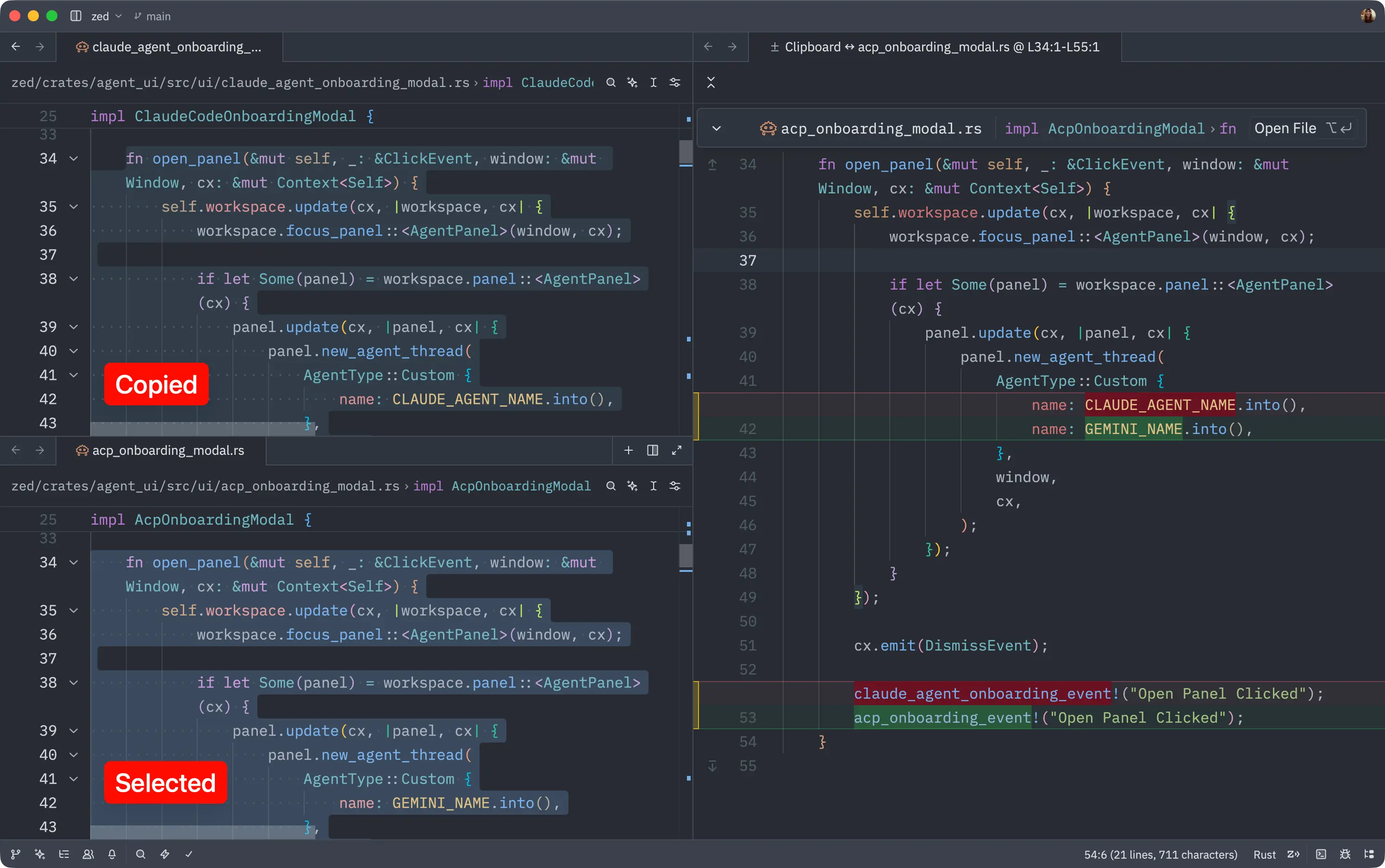
This makes it easy to spot the differences between the original and modified code. Once you've identified any discrepancies, you can revert the changes and try again.